Deep Translate - All Language
- 4.7
- Rating
- 5.00M
- Installs
- Free
- Price
 Analysis by App-foxy
I often think of translation as a small task that quietly breaks a productive day. A message arrives in another language, a photographed notice needs checking, or a document contains one paragraph I cannot understand. The actual translation may take only a minute, but switching between websites, camera tools, copy-and-paste fields, and separate voice utilities creates unnecessary friction. Deep Translate - All Language, a productivity app from Readerland, is designed to bring those moments into one place.
After using it as a practical translation companion, I found its biggest value is not simply that it translates text. Its broader approach covers typed text, spoken input, photos, documents, and screen content, so the useful question is not “Can it translate?” but “Which form of translation fits the thing in front of me?” That makes it easier to build a repeatable habit instead of improvising every time a language barrier appears.
The app is free to install and is suitable for Everyone. It has reached over five million installs and holds a 4.7 average from around 107 thousand ratings, which gives it a reassuring level of visibility among Android users. Readerland released it on March 18, 2025, and version 2.0.0 is the version I considered here. It requires Android 8.0 or later, so it remains accessible on many older devices.
You May Also Like

 Blood Strike: 2.5 Anniversary
Blood Strike’s Loadouts Turn Every Drop Into a Tactical Gamble
A close look at Blood Strike’s custom loadouts: how fast access to signature weapons reshapes its battle royale rhythm, rewards preparation, and narrows the gap between fights.

 Pandora - Music & Podcasts
Pandora’s Music Is Easy to Start, but Harder to Recover
Pandora’s strength is its low-effort path from a seed to a station. Its weak spot is how much confidence it asks you to place in connection, setup, and quiet recovery.

 8 Ball Pool
 Is Built on Rivalries, Rematches, and Routine
A close look at the rivalries, rematches, shared routines, and unanswered safety questions that turn a quick pool match into a persistent mobile community.

 Samsung Music
’s Quiet Strength Is Playing What You Already Own
Its reach comes less from spectacle than from dependable access to a personal library. That simplicity is both the app’s strongest retention engine and its ceiling.

 AccuWeather: Weather Radar
AccuWeather Review: A Quick, Clear Forecast for Everyday Decisions
For everyday plans, the best forecast is the one you can understand quickly. AccuWeather makes rain timing, radar, and local conditions easy to act on, with a few trade-offs.

 Hill Climb Racing
Why Hill Climb Racing Still Turns Crashes Into One More Run
A tiny car, a bumpy hill and one more upgrade: Hill Climb Racing keeps resurfacing because its simple chaos makes every near-miss feel personal.
More From Our News Desk



Turning scattered translation tasks into one workflow
I find the most useful way to think about this section is as a change in starting point: instead of choosing a translator before I know what kind of material I have, I begin with the words, image, document, or screen in front of me. That small shift can make quick language checks easier to fit into a busy day, and it leads naturally to the practical question of which input method works best for each situation.
What usually happens before opening the app
Before I use a translation tool, the material is rarely neat. A sentence might be inside an email, a menu might be printed on paper, and a conversation might be happening too quickly for typing. The usual alternative is to choose a different tool for each situation: a browser translator for copied text, a camera utility for images, and a voice assistant for speech. That approach works, but it makes translation feel like a series of interruptions.
Deep Translate - All Language is more useful when I treat it as a single entry point. Instead of deciding which service is appropriate first, I begin with the material itself. If I can type or paste it, I use text translation. If the words are printed, I move toward photo or document translation. If speaking is faster, voice input is the natural route. For something visible inside another application, screen translation can reduce the need to reproduce the content manually.
The practical advantage is reduced decision-making, not just more translation modes. That matters in a productivity system because small choices accumulate. A tool that lets me respond to the situation in front of me is easier to use consistently than a collection of specialized utilities that each require a separate mental step.
Text translation for quick, controlled checks
Typed translation remains the most predictable way to work. I can paste a sentence, inspect what I entered, choose the language direction, and compare the result with the original. This is the mode I would use for a short message, a product instruction, or a phrase I want to understand before replying.
There is an important distinction between understanding and publishing. For understanding, a quick translation can be enough to reveal the general meaning. For a formal email, contract, medical instruction, or legal document, I would not treat an automated result as the final authority. Deep Translate can help me identify what a passage is about and where the difficult wording is, but a professional human review is still the safer choice when a mistake could have serious consequences.
One habit improved my results: I translate shorter logical sections rather than dumping a long, poorly formatted block into the input. Breaking a message at natural sentence boundaries makes it easier to spot ambiguity and compare the source with the result. This is especially useful when the original text contains names, addresses, measurements, or technical terms that should not be casually interpreted.
Photo and document translation in everyday situations
Photo translation is the mode I find most valuable when the source cannot be copied. A label, sign, menu, receipt, or printed instruction can be handled without retyping every word. That saves time, but it also changes how I approach the task: I first take a clear image that includes only the relevant area, then check the translation against the visible source instead of assuming the captured text is perfect.
Image quality has a direct effect on usefulness. Glare, curved pages, tiny lettering, unusual fonts, and crowded backgrounds can make recognition less reliable. I get better results by holding the phone steady, filling the frame with the text, and avoiding a photograph that includes too much irrelevant scenery. This is a simple workflow improvement, but it prevents a common mistake: blaming the translation when the real problem was that the words were not captured cleanly.
Document translation is better suited to material that is too long or structured for a single photograph. I would use it for a set of instructions, a school handout, or a work document that needs quick comprehension. The trade-off is that longer material deserves more checking. Headings, tables, footnotes, and formatting can carry meaning that a straightforward translation may not preserve perfectly, so I use the translated document as a working aid rather than automatically treating it as a polished replacement.
A useful workflow is to translate the full document for orientation, then return to the sections that affect my decision. This is faster than reviewing every line with equal attention. It also keeps the app in its strongest role: helping me locate and understand information quickly, while leaving high-stakes interpretation to a more careful process.
Voice input and screen translation without breaking concentration
Voice translation is helpful when my hands are occupied or when typing would slow down a real conversation. I can imagine using it while travelling, asking about a service, or trying to understand a spoken request. The important limitation is that spoken language is messy. Background noise, accents, overlapping voices, and incomplete sentences can all affect the result.
I get more dependable use from voice input when I speak in short, complete phrases and pause between ideas. That may feel less natural than speaking freely, but it gives the app a cleaner source to work with. In a conversation, I would also confirm important details by repeating names, times, or locations rather than relying on one translated sentence.
Screen translation addresses a different kind of friction. Sometimes the text I need is inside an app, webpage, or image where selecting and copying is difficult. Being able to work from what is already displayed can be much quicker than recreating the content elsewhere. I see this as particularly useful for browsing unfamiliar interfaces or checking a short passage while keeping the original context visible.
Still, screen-based translation should be used thoughtfully. A translated overlay or result can help me understand a page, but it may not preserve every visual relationship, button label, or formatting detail. When I need to complete an important form, I prefer translating the relevant fields carefully and checking them against the original before submitting anything.
A repeatable routine for sustainable productivity
The app becomes more valuable when it has a defined place in my routine. I would use a simple three-step process: capture the source, translate only what I need, and record the action that follows. The final step is easy to overlook. Translation should lead to a decision, reply, saved note, or completed task; otherwise it can become another form of browsing.
For example, imagine receiving a delivery message in another language while working. I would first use text translation if the message can be copied. If it is embedded in an image, I would switch to photo translation. After understanding the delivery window, I would write the time in my task system and close the translation app. That keeps the tool connected to an outcome instead of allowing the translation itself to become a distraction.
For recurring work, I would keep a small personal glossary outside the app for names, specialist vocabulary, and phrases that need consistent treatment. A translator can provide a useful first pass, but a glossary protects consistency across repeated emails or documents. This is one of the clearest ways to combine Deep Translate with a broader productivity system: let the app handle the immediate language barrier, while your own notes preserve decisions and terminology.
I also recommend separating “understand now” from “translate perfectly.” If I am trying to decide whether a message needs an answer, a quick result may be enough. If I am preparing something for a client, I slow down, compare the source, and consider a human review. That distinction prevents both overchecking trivial material and underchecking important material.
Where the experience can fail
No translation app removes the uncertainty built into language. A sentence can be grammatically clear but culturally ambiguous. A short phrase may have several meanings depending on context, and a literal result may sound unnatural even when it is technically understandable. Deep Translate is therefore most convincing as a fast comprehension tool, not as a guarantee of perfect nuance.
Input quality is another failure point. A blurry photograph, noisy recording, or crowded screen gives the app a difficult starting point. When a result looks strange, I go back to the source before deciding that the translation is wrong. Retaking a photo or shortening a spoken phrase often produces a bigger improvement than repeatedly requesting the same translation.
There is also a workflow cost when a translation requires several passes. If I need to compare multiple versions, preserve exact formatting, or collaborate on a polished multilingual document, a dedicated desktop translation environment may be more comfortable. Deep Translate is well suited to quick mobile work, but mobile convenience does not automatically replace the control of a larger editing setup.
The free access makes trying the app straightforward, although in-app purchases range from $4.99 to $49.99 per item. I would check the available purchase details inside the app before committing, especially if I expect to use it frequently. For occasional translation, the free starting point may be enough. For heavy use, the value depends on which parts of the workflow are included without payment and how often I need the more advanced options.
Another point is privacy awareness. I would avoid sending highly sensitive material into any online translation service unless I had considered the consequences and was comfortable with the app’s current handling of that content. Personal identification numbers, confidential business documents, and private medical information deserve extra caution. The convenience of translating a document should not override the need to protect it.
Who will benefit most from adopting it
I think Deep Translate - All Language is a strong fit for travellers, multilingual households, students, customer-support workers, and anyone who regularly encounters mixed-language content on a phone. It is especially useful for people who move between formats: a typed message in the morning, a photographed notice later, and a spoken exchange during the day.
It also suits users who want a low-friction starting point rather than a complicated translation workspace. The free entry point, Everyone age rating, and support for Android 8.0 or later make it approachable for a broad range of users. Its current scale, with more than five million installs and around 107 thousand ratings, suggests that it has found an audience beyond a narrow professional niche.
I would be more cautious about recommending it as the only tool for professional translators, publishers, or teams that require strict terminology management and precise document formatting. Those users may prefer specialist software with deeper editing, review, and collaboration controls. I would also skip it if I only need occasional translations of short text and already have a trusted tool built into my daily workflow; adding another app would not necessarily improve that system.
For families, the photo feature could be practical when helping someone understand an imported product, a school notice, or travel information. For students, it can help with initial comprehension, but I would not use it to bypass learning. Translating a paragraph first and then studying the original vocabulary is more useful than copying every assignment into the app and accepting the result without thought.
My overall view after fitting it into a routine
Deep Translate - All Language earns its place by making translation available in the form the moment requires. Text, voice, photos, documents, and screen content are not equally useful every day, but together they reduce the need to search for a separate solution whenever the source changes.
My recommendation is strongest for everyday understanding and quick decisions. It can help me move past a language obstacle, identify what deserves attention, and continue with the task that brought me there. Its weaknesses appear when context, formatting, confidentiality, or professional precision matter more than speed. In those cases, I would use it as a first pass and bring in a human or specialist tool.
Readerland has positioned this free productivity app as a practical mobile companion rather than something I would reserve for rare emergencies. With a 4.7 average and a current version of 2.0.0, it feels easy to justify trying, particularly for users who regularly deal with more than one language. The best results come from treating it as one step in a deliberate system: capture clearly, translate proportionately, verify important details, and turn the result into an action.
That approach keeps the app useful without making it the authority on every sentence. For my own routine, that balance is the reason I would recommend it to a friend: it removes a lot of small barriers, while still leaving room for common sense when the wording truly matters.
FAQs for Deep Translate - All Language
01What languages does Deep Translate - All Language support?
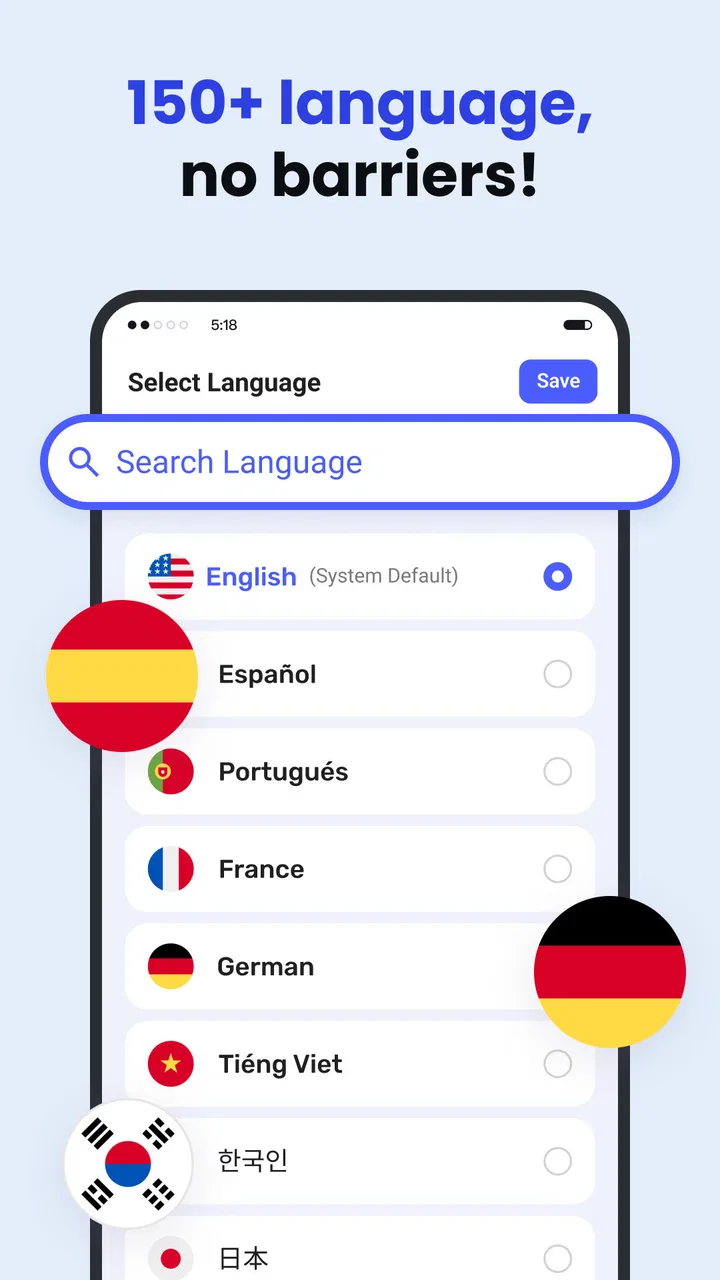
Deep Translate - All Language is designed to support a wide array of languages, catering to global users. The app covers over 100 languages, including popular ones like Spanish, French, Chinese, and Arabic. This extensive list ensures that users can communicate and understand content from almost any part of the world.
02How accurate are the translations provided by Deep Translate?
Deep Translate utilizes advanced AI technology to deliver highly accurate translations. While no automated translation tool is perfect, the app consistently updates its algorithms to improve comprehension and context recognition. Users generally find the translations reliable for both everyday communication and professional use.
03Is Deep Translate - All Language easy to use for beginners?
Yes, Deep Translate is designed with user-friendliness in mind, making it accessible for beginners. The interface is intuitive, with clear instructions and easy navigation. Users can quickly input text, choose languages, and receive translations without needing any technical expertise.
04Are there any offline features available in Deep Translate?
Deep Translate offers offline translation capabilities for certain languages. Users can download language packs for offline use, allowing them to access translations even without an internet connection. This feature is particularly beneficial for travelers or those in areas with limited connectivity.
05Does Deep Translate offer voice translation features?
Yes, Deep Translate includes voice translation functionality. Users can speak into their devices, and the app will translate spoken words into the selected language. This feature is useful for real-time conversations and helps bridge communication gaps in verbal exchanges.
Pros
- Supports over 100 languages seamlessly.
- Fast translation with minimal delay.
- User-friendly interface for easy navigation.
- Offline mode available for select languages.
- Accurate voice recognition for translations.
Cons
- Contains ads that can interrupt usage.
- Some languages lack full offline support.
- Occasional inaccuracies with slang terms.
- Requires internet for most features.
- Limited customization of interface.

Deep Translate - All Language
Gallery